
INDUSTRY GUIDE · FIELD NOTES
Time Tracking for Accounting Firms
Plan attendance reviews for accounting teams, reconcile exceptions before payroll and keep application activity separate from billable output.
StafflyTracker editorial · Product by Syed Toheed Shah

Time tracking for accounting firms should make attendance and workload easier to explain without confusing time at a computer with accurate financial work. StafflyTracker gives Windows-based teams clock-ins, breaks, attendance records and application context. Keep client billing, reconciliation sign-off and financial approvals in the accounting systems that own those records.
Start with the close process, not a mouse score
A month-end close contains very different kinds of effort. A junior associate may enter transactions rapidly, while a reviewer reads a variance report for twenty minutes without changing windows. Both can be working. Comparing their keyboard activity as if they had the same assignment rewards the visible input rather than the accounting outcome.
Before installing a tracker, name the operational question. You may need to know whether an evening team was present, whether a reconciliation queue needs help, or why a planned handoff slipped. Those questions need attendance, queue status and task context together. A percentage alone cannot answer them.
Use department productivity rules for the finance team. Classify your accounting applications and relevant browser titles deliberately, then test the matches with non-sensitive records. Avoid a broad rule that makes every browser window productive simply because the team uses a browser-based ledger.
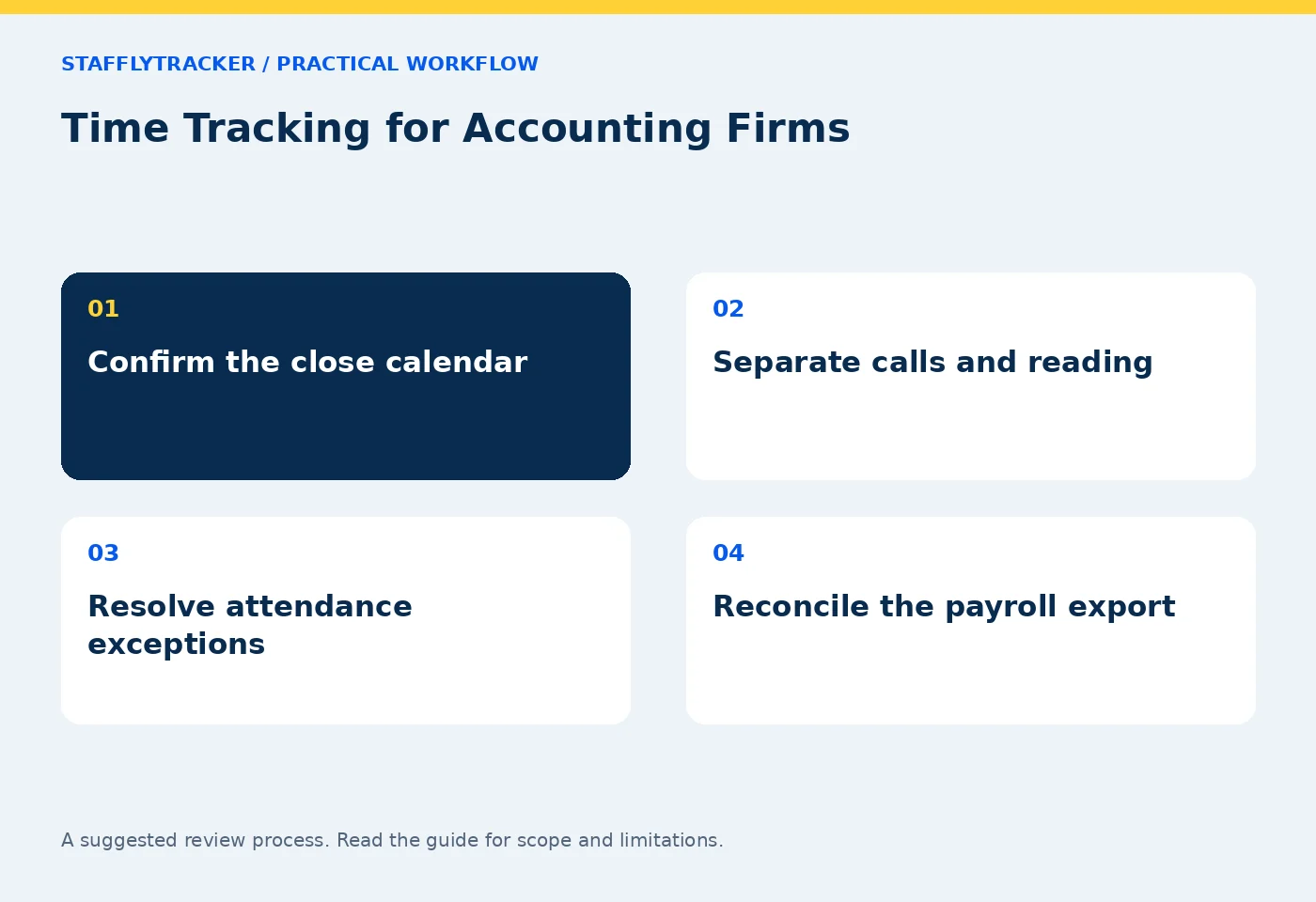
A practical daily review
Start with expected staff, scheduled workdays and approved leave. Check whether a person has an open clock session and separately whether the Windows tracker is connected. A clock-in is an attendance event; it does not guarantee that screenshots or activity records are arriving.
Next, review exceptions rather than every minute. A missing afternoon interval may reflect a network interruption, a meeting, a forgotten clock-in or genuinely unrecorded work. Ask the employee which explanation fits, and compare with the reconciliation or close checklist. Record corrections with a reason rather than silently changing the original evidence.
Finish with outstanding deliverables: reconciliations completed, review notes resolved, missing documents requested and handoffs accepted. These are examples of outcome measures to maintain in your existing workflow, not automatic StafflyTracker metrics.
Worked example: the month-end reviewer
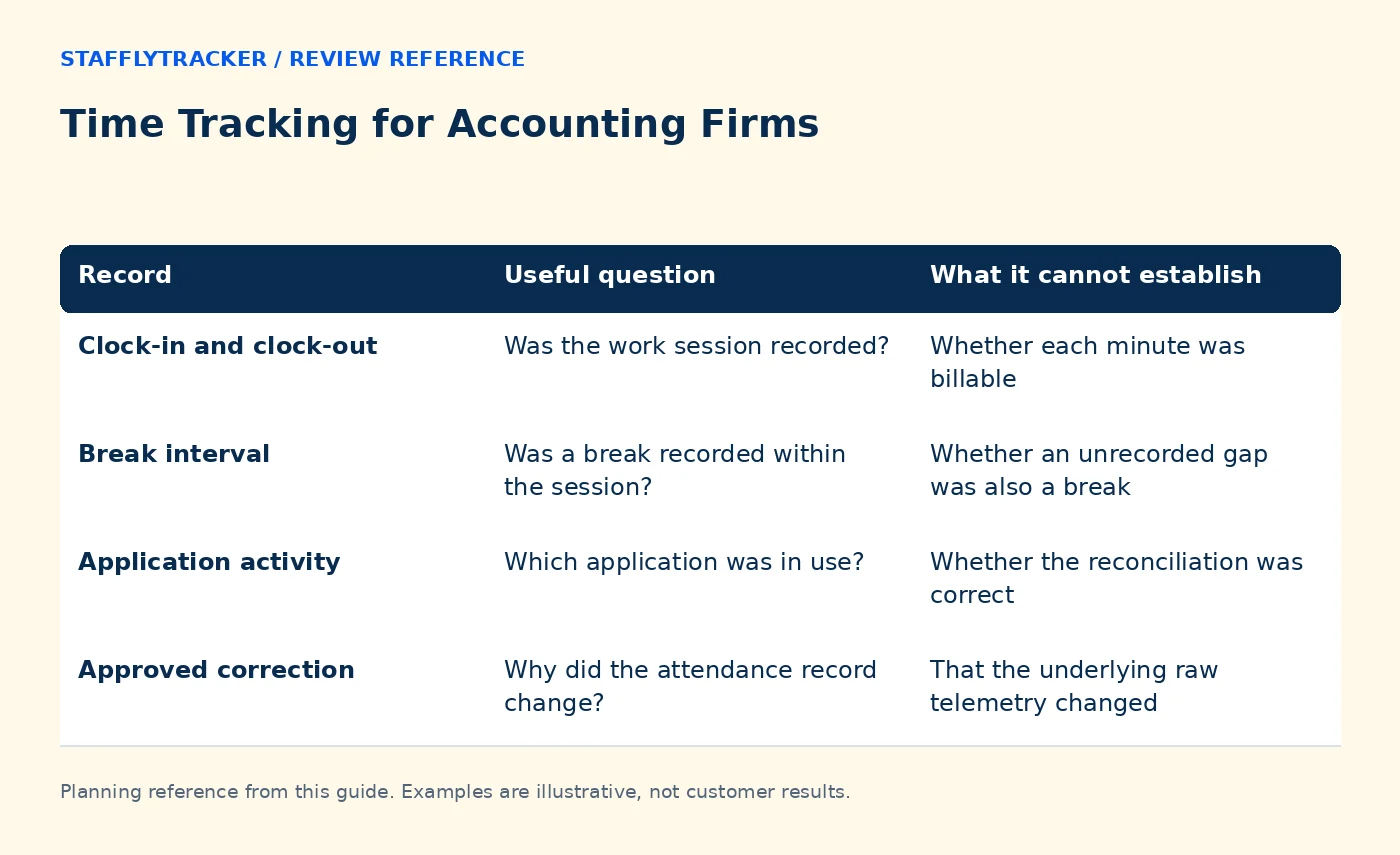
Consider an illustrative reviewer with an eight-hour clock span, a one-hour recorded break and seven hours of working time. During the afternoon, thirty minutes have no tracker coverage. Do not label that interval idle merely because it lacks records. Keep it as a coverage question until the reviewer explains what happened.
The reviewer also spends forty minutes on a static variance workbook. A repeated screenshot establishes that the display looked similar at the captured moments. It does not establish that the reviewer stopped reading, comparing figures or speaking to a colleague. Ask about the resulting review notes instead of deducting time from a still image.
| Record | Useful question | What it cannot establish |
|---|---|---|
| Clock-in and clock-out | Was the work session recorded? | Whether each minute was billable |
| Break interval | Was a break recorded within the session? | Whether an unrecorded gap was also a break |
| Application activity | Which application was in use? | Whether the reconciliation was correct |
| Approved correction | Why did the attendance record change? | That the underlying raw telemetry changed |
Protect the review environment
Accounting screens can contain customer names, bank details and transaction information. Demonstrate the tracker using fictional records first. Decide what screenshots are appropriate, who may review them and how long they should remain available before enabling capture in a real workflow. A generic software demonstration cannot establish suitability for your firm's confidentiality obligations.
StafflyTracker managers currently have company-wide review access. Departments change productivity classification; they are not separate permission walls. If your firm requires reviewers to see only their own client team, document that requirement before purchasing. Read roles and access and collection scope together.
A rollout that fits accounting work
Pilot one ordinary day and one busy close day. Include an associate, a reviewer and an administrator, but track only the employee accounts meant to record time. Test a genuine break, a call, an overnight finish and a short network interruption. Reconcile each example manually before relying on an export.
Agree who can approve corrections and when a pay period becomes final. Keep the final attendance export with its timezone, period and approval note. StafflyTracker can calculate and export payroll inputs; it does not transfer wages, file taxes or replace a client billing ledger.
Evaluate price and product fit
The published plan is $4 per tracked employee monthly, or $3 per month equivalent billed annually, with a ten-employee minimum. Review current pricing and screenshot limits rather than assuming unlimited capture or storage. The recording agent supports Windows 10/11 x64; browser access on another device does not create a native tracker for that device.
When comparing with Time Doctor, run the same reviewer scenario in both demos. Check the distinction between attendance and connection, the correction workflow, exports and the features your client billing process needs. Our buyer's checklist helps make that comparison concrete.
Questions accounting teams ask
Can the tracker decide which hours to bill a client?
No. Application context is not a client-approved timesheet. Use your engagement terms and billing system to determine chargeable work.
Does a quiet mouse mean an accountant is idle?
No. Reading, reviewing and discussing a reconciliation may involve little input. Activity records need the assignment and its outcome for context.
What should we test before ordering?
Use the fictional demo to inspect attendance and timelines, then request a pilot around your actual Windows fleet and close process. Do not upload real financial documents just to explore the product.
KEEP EXPLORING
Make the next decision clearer.
Time Tracking for Legal Operations Attendance Reconciliation Before Payroll Employee Time Tracking Buyer’s ChecklistSEE THE WORKFLOW
Bring your questions.
Try the actual interface.
Explore fictional records, then discuss the requirements that matter to your team. Email required; phone optional.
AI-assisted editorial content and original illustrations. Examples are illustrative, not customer results. Editorial policy · Current product availability · Read as Markdown